 Google

How to use Nano Banana 2
- Write a prompt that describes the picture.
- Add images if you want to guide the result. This is optional.
- Pick how many images to make (up to 4).
- Choose Open in a workflow. Sign in, check the credit estimate on the board, then run it.
- Connect the result to the next step on the board, such as an editor or another model.
Inputs explained
- Prompt (required)
- Set the prompt used by this model. Type: text.
- Aspect Ratio (optional)
- Set the aspect ratio used by this model. Type: text. Options: auto, 21:9, 16:9, 3:2, 4:3, 5:4, 1:1, 4:5, 3:4, 2:3, 9:16, 4:1, 1:4, 8:1, 1:8. Default: "auto".
- Enable Web Search (optional)
- Set the enable web search used by this model. Type: boolean. Default: false.
- Image 1 (optional)
- Set the image 1 used by this model. Type: image.
- Limit Generations (optional)
- Set the limit generations used by this model. Type: boolean. Default: true.
- Number of Images (optional)
- Set the number of images used by this model. Type: number. Minimum: 1. Maximum: 4. Default: 1.
- Output Format (optional)
- Set the output format used by this model. Type: text. Options: jpeg, png, webp. Default: "png".
- Resolution (optional)
- Set the resolution used by this model. Type: text. Options: 0.5K, 1K, 2K, 4K. Default: "1K".
- Safety Tolerance (optional)
- Set the safety tolerance used by this model. Type: text. Options: 1, 2, 3, 4, 5, 6. Default: "4".
- Reference Images (optional)
- Set the reference images used by this model. Type: list of image.
Tips before you run
Start with the default settings and change one input at a time. Keep the result you like on your board so the next step can use it.
If you add a reference file, use a link the workflow can read. Check the inputs and credit estimate on the board before starting a run.
Nano Banana 2 pricing
Nano Banana 2 costs about 20 credits per image at default settings. You pay with Wireflow credits, and the board shows the estimate for your settings before you run.
See Wireflow plans and credits
Nano Banana 2 vs GPT Image 2
| Detail | Nano Banana 2 | GPT Image 2 |
|---|---|---|
| Maker | OpenAI | |
| Price at default settings | ~20 credits per image | ~30 credits per image |
| Works from | A prompt or images | A prompt or an image |
Both run on one Wireflow board, so you can try the same prompt on each. Try GPT Image 2.
Nano Banana 2 examples
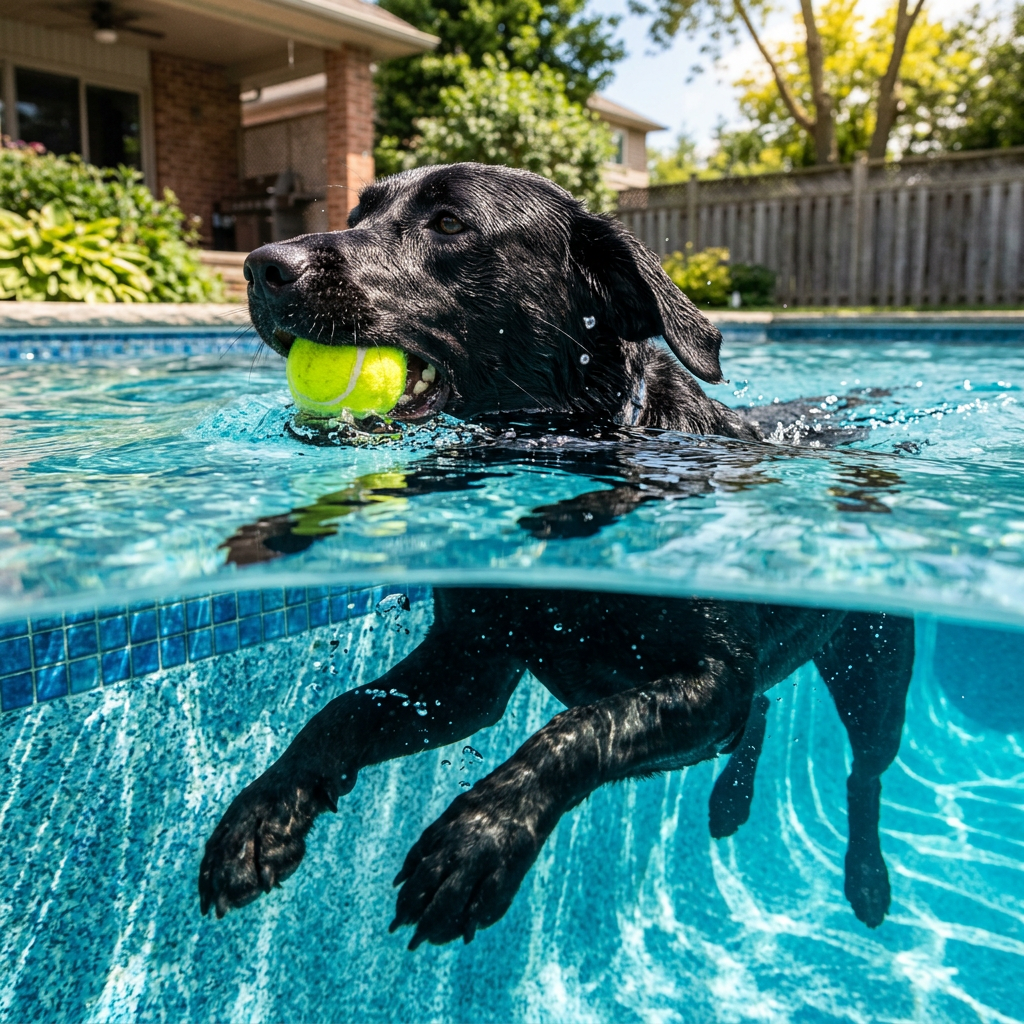
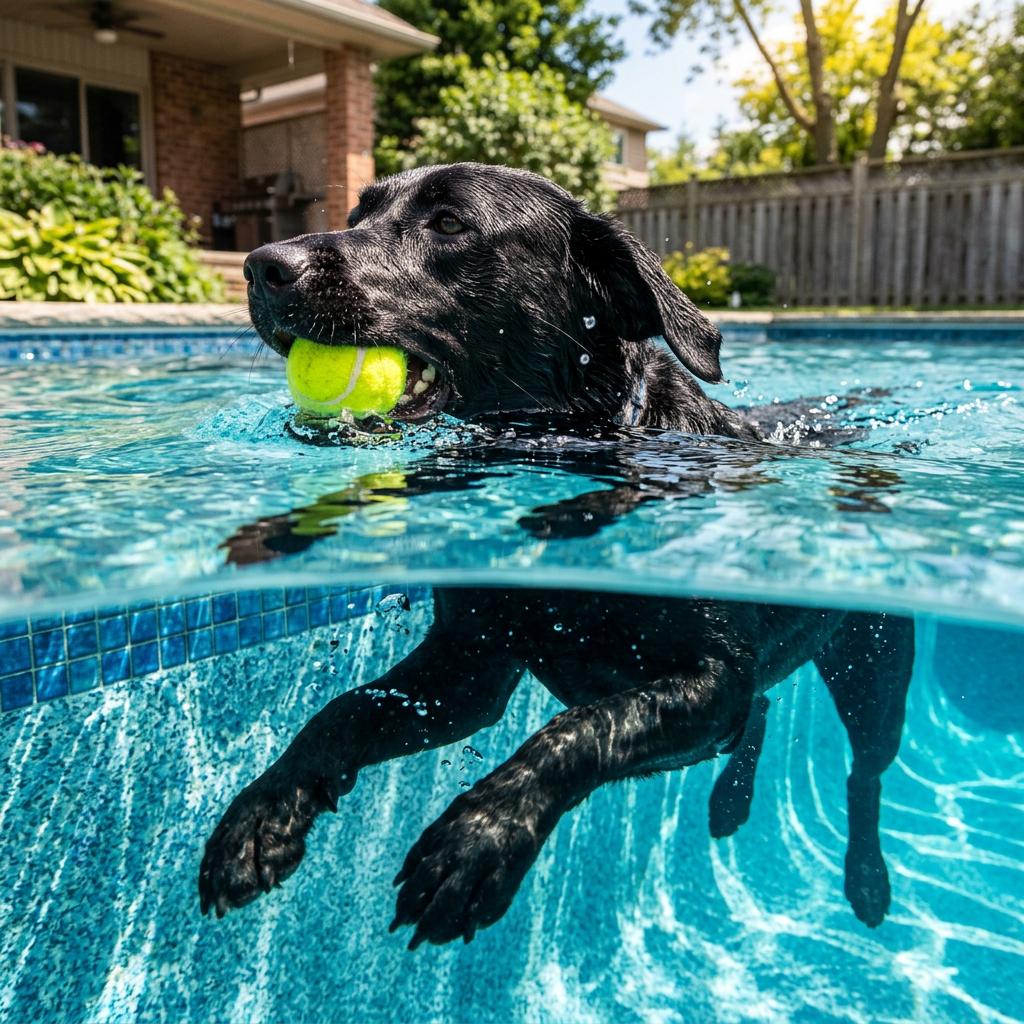
Example prompt and result.
An action shot of a black lab swimming in an inground suburban swimming pool. The camera is placed meticulously on the water line, dividing the image in half, revealing both the dogs head above water holding a tennis ball in it's mouth, and it's paws paddling underwater.
Nano Banana 2 API
Run Nano Banana 2 from your own code with the Wireflow API. Open it in a workflow, then call the run endpoint with that workflow's ID and poll for the result. Agents can run it through MCP.
# Model: Nano Banana 2. Open a workflow first.
# Replace YOUR_WORKFLOW_ID with the ID in its /flow/ URL.
curl 'https://www.wireflow.ai/api/v1/workflows/YOUR_WORKFLOW_ID/run' \
  -H 'Authorization: Bearer YOUR_WIREFLOW_API_KEY' \
  -H 'Content-Type: application/json' \
  -d '{"nodeIds":["model"]}'

# Response (202):
# {"data":{"executionId":"...","status":"running",
#  "poll":"/api/v1/workflows/executions/.../poll"}}
# GET the returned poll path with the same Authorization header.
Open the SDK examples. Read the run API docs or connect your agent.
Nano Banana 2
Generate professional-quality images in 5 to 10 seconds using Google's Gemini 3.1 Flash architecture. Nano Banana 2 combines speed with precision for text rendering, object consistency, and photorealistic details that scale to 4K resolution without quality loss.
Connect Text Prompts to Image Generation
Write natural language descriptions and Nano Banana 2 interprets context, style, composition, and world knowledge to create accurate visuals. The model understands multilingual prompts across 100 plus languages, translating intent into photorealistic images with vibrant lighting and rich texture detail in under 10 seconds.
Edit Images with Natural Language
Use conversational commands to swap objects, change styles, adjust lighting, or modify backgrounds on existing images without manual editing tools. Nano Banana 2 maintains subject consistency across edits, preserving identity for up to five characters or 14 objects throughout iterative refinement workflows.
Upscale to 2K and 4K Resolution
Route generated images through upscaling nodes to increase resolution from standard outputs to 2K or 4K quality for print, video production, or high-resolution web graphics. The model preserves fine details and text clarity during upscaling, similar to how [AI image upscaler](https://www.wireflow.ai/features/ai-image-upscaler) workflows enhance resolution without introducing artifacts.
Why Use Nano Banana 2
3x Faster Generation
Produce images in 5 to 10 seconds compared to 15 to 30 seconds for traditional models, enabling rapid iteration and real-time creative workflows. Perfect for prototyping visual concepts or batch generation at scale, like building [AI image generator](https://www.wireflow.ai/ai-image-generator) pipelines that need sub-10-second turnaround per asset.
4K Resolution Output
Generate or upscale images to 4K quality for professional print, video production, or high-DPI displays without external upscaling tools. Gemini 3.1 Flash maintains sharpness and detail at high resolutions, matching the output quality of slower studio-grade models while keeping generation time under 10 seconds per image.
Multilingual Text Rendering
Embed accurate text in 100 plus languages directly in generated images with precise kerning, alignment, and font consistency. Unlike models that struggle with non-Latin scripts, Nano Banana 2 handles Chinese, Arabic, Cyrillic, and specialized characters natively for global design workflows requiring typographic accuracy in visual assets.
Vibrant Lighting and Texture
Produce photorealistic images with natural lighting gradients, surface reflections, and material textures that rival DSLR photography. Gemini's training on high-quality visual data results in richer color depth and believable physical properties compared to first-generation diffusion models, making outputs suitable for [AI video generator](https://www.wireflow.ai/ai-video-generator) source material or marketing visuals.
Subject Consistency
Maintain identity for up to five characters or 14 objects across multiple generations without drift or style variation. Perfect for creating character sheets, product variations, or sequential visual storytelling where continuity matters, similar to how platforms like [Seedance 2.0](https://www.wireflow.ai/seedance-2-0) handle video frame consistency across longer durations.
Use Nano Banana 2 in Your Workflows
Connect Google's fastest image generation model to your creative pipelines for 5 to 10 second turnaround on photorealistic images with 4K upscaling, multilingual text, and subject consistency across multiple characters or objects.
Working with this model
Reference images
Wire Reference Images once and hand it several images: it is a list port, so several wires into that one socket all survive, and so does a single upstream that emits several images.
Image 1 and the numbered Image 2..Image 10 slots go first, in slot order, and then everything on Reference Images, in wire order. The same URL wired into both a slot and the list keeps its slot position and counts once.
Whatever ends up first in the request is the image the model EDITS, and that is Image 1 only when Image 1 is wired. Leave Image 1 empty and wire Image 2 instead, and Image 2 becomes the image being edited. The numbered slots are read in slot order and an empty one is simply skipped. Wire the subject to Image 1.
The first 10 images reach the model. Anything past 10 is dropped, silently as far as the request goes, and the numbered slots win: if 10 slots are wired, nothing on Reference Images is sent. There is no run warning for the drop yet.
You do not need to stitch reference photos into one contact sheet any more, and you should not: stitching divides every face by the number of photos in the sheet before the model ever sees it.
Skip node passes Image 1 through while Image 1 is the ONLY numbered slot wired. It serves whatever is on Image 1, never a reference, and Reference Images can be wired alongside without changing that.
Wire a second numbered slot (Image 2 and up) and the card can no longer be skipped transparently: two numbered slots are two candidate sources and nothing on the card says which one to pass on, so Skip passes NOTHING and the run record says so per node. Leaving Image 1 empty passes nothing for the same reason. This is not new to Reference Images; a card with two numbered slots behaved this way before that socket existed.
Read more
Nano Banana 2 FAQ
What is Nano Banana 2?
Nano Banana 2 is Google's AI image generation model powered by Gemini 3.1 Flash Image that creates photorealistic images from text prompts in 5 to 10 seconds. It supports multilingual text rendering, 4K upscaling, subject consistency for multiple characters, and natural language editing without manual tools.
How fast is Nano Banana 2 compared to other models?
Nano Banana 2 generates images three times faster than previous models, averaging 5 to 10 seconds per image versus 15 to 30 seconds for competitors. The speed comes from Gemini 3.1 Flash's optimized architecture that balances quality with inference efficiency for real-time creative workflows.
Can Nano Banana 2 edit existing images?
Yes, Nano Banana 2 accepts natural language editing commands like object swapping, style changes, background modifications, and lighting adjustments without manual masking or layer manipulation. The model maintains subject identity across edits, preserving consistency for up to five characters or 14 objects throughout iterative refinement.
What resolution can Nano Banana 2 output?
Nano Banana 2 generates standard images that can be upscaled to 2K or 4K resolution while preserving fine details and text clarity. The Gemini 3.1 Flash architecture handles high-resolution synthesis without artifacts, making outputs suitable for print, video production, or high-DPI display requirements.
Does Nano Banana 2 support text in images?
Yes, Nano Banana 2 renders precise text in over 100 languages with accurate kerning, alignment, and font consistency. Unlike earlier models that struggle with non-Latin scripts, it handles Chinese, Arabic, Cyrillic, and specialized characters natively for typography-heavy design work.
How much does Nano Banana 2 cost?
Nano Banana 2 is available free with credits on platforms like nano-banana.ai, through the Gemini app, and via Vertex AI for developers with API pricing. Pro variants using Gemini 3 Pro Image offer enhanced quality and priority processing at higher per-image costs for professional workflows.
Can I use Nano Banana 2 in workflows?
Yes, Nano Banana 2 integrates into visual workflow platforms via API connections, allowing you to chain it with other models for image-to-video synthesis, upscaling, style transfer, or automated publishing pipelines. Its speed makes it ideal for batch generation steps that need sub-10-second turnaround.
What makes Nano Banana 2 different from other image models?
Nano Banana 2 combines Gemini's world knowledge training with three times faster generation speed, multilingual text accuracy, subject consistency for multiple objects, and native 4K upscaling. The model excels at photorealistic lighting and texture details while maintaining sub-10-second inference times for real-time creative iteration.
Is Nano Banana 2 free?
Running it uses Wireflow credits, about 20 credits per image. You can set up the inputs here and open a workflow before you spend anything.
How many images can Nano Banana 2 make at once?
Up to 4 per run.
Can I use Nano Banana 2 commercially?
Yes. What you make with Nano Banana 2 on Wireflow is yours to use for personal and commercial work, subject to the model maker's own terms. Our terms of service have the details.
Does Nano Banana 2 have an API?
Yes. Save a workflow with Nano Banana 2, then call the Wireflow run API with its workflow ID. The API tab above has examples you can copy, and agents can run it through MCP.
How do I use Nano Banana 2?
Set the inputs above and choose Open in a workflow. Sign in to save your board, then check its credit estimate before you run.